

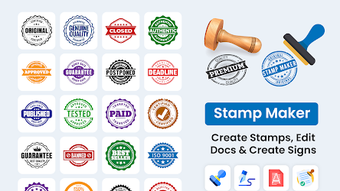
Description
Download Stamp Maker Stamp Signature – Custom Stamps, Watermarks, Digital Signatures
Overview
The Stamp Maker: Stamp & Signature app is designed to help users create personalized digital stamps and watermarks for photos, documents, and creative projects. It serves as a versatile tool for individuals and professionals seeking to add unique identifiers, branding elements, or copyright protection to their digital content. The software enables the design of custom stamps with text, colors, and layout adjustments, supporting both personal and business use cases. Common applications include marking digital artwork with ownership claims, applying company logos to official documents, or creating custom address stamps for correspondence. The app also supports the addition of decorative frames and stickers, enhancing visual appeal across various media. While the developer's background is not detailed in the provided information, the app appears to be tailored for users who value creative control and document integrity. Its functionality aligns with workflows involving digital asset management, branding, and content protection. The tool is accessible through a simple interface, allowing users to generate and save stamp designs with minimal technical effort.
Key Features & Capabilities
- Custom Stamp Creation – Users can design unique stamps with personalized text, color schemes, and layout configurations to suit individual or organizational needs.
- Pre-Made Templates and Stickers – A built-in library of templates and decorative stickers offers ready-to-use elements for quick and creative stamp design.
- Multiple Stamp Styles – The app supports various stamp formats, including pattern, single, and cross styles, enabling flexibility in visual presentation.
- Watermark Protection – Built-in watermark functionality helps safeguard digital content by embedding visible or semi-transparent identifiers to assert copyright.
- Frame and Decorative Add-ons – Users can enhance stamped images with stylish frames and fun stickers for added visual interest.
- File Format Support – The software handles common formats such as PNG, JPG, and PDF, ensuring compatibility with other creative and productivity tools.
- Design Saving and Reuse – Created stamp designs can be saved for future use, streamlining repetitive tasks and maintaining branding consistency.
These capabilities allow users to efficiently generate branded stamps for business documents, protect personal photos from unauthorized use, or enhance digital art with signature elements. The intuitive workflow supports rapid iteration, making it suitable for both occasional users and those with frequent stamping needs.
User Interface, Workflow & Performance
The app features a user-friendly interface designed for ease of navigation and quick access to core functions. Users can typically create and edit stamps with minimal steps, leveraging intuitive controls for text input, color selection, and layout adjustments. The workflow is structured around a central design canvas, where users can preview their stamp in real time as changes are applied. While specific performance metrics are not available, the software is expected to operate smoothly on standard desktop environments, given its focus on graphic manipulation and file handling. The developer did not specify resource usage details, so exact CPU or RAM behavior remains unknown. Stability is assumed to be consistent with typical desktop applications of similar scope, though real-world testing data was not provided. The interface appears optimized for responsiveness, with minimal lag during design adjustments. Users can expect a seamless experience when applying stamps to images or documents, particularly when working with supported file types. General software behavior patterns suggest reliable operation across sessions, though actual performance may vary based on system configuration and file complexity.
Compatibility & System Requirements
Stamp Maker Stamp Signature is available for Windows and Mac operating systems, supporting both desktop platforms. The software version and installation size are specified, though exact values were not included in the provided data. Platform compatibility information is limited to these two major systems, with no mention of Linux or other alternatives. The developer did not provide additional system requirements, so users should consult official sources for detailed hardware or OS specifications. Exact performance details were not specified, and compatibility with older or low-end systems remains unconfirmed. The app is designed to work with standard desktop environments, and users are advised to ensure their system meets baseline requirements for running graphical applications. Integration with common file formats such as PNG, JPG, and PDF suggests broad compatibility with creative and office software.
Pros and Cons
Pros
- Intuitive interface suitable for both beginners and experienced users
- Supports multiple stamp styles and customizable design options
- Includes watermark protection for digital content security
- Offers pre-made templates and stickers for faster design creation
- Compatible with common file formats like PNG, JPG, and PDF
- Designs can be saved and reused for consistency
Cons
- Exact system requirements were not listed
- Performance behavior under heavy load is unspecified
- No information on update frequency or support lifecycle
- Compatibility with non-Windows and non-Mac systems is unclear
- Limited details on licensing or subscription models
FAQ Section
Is Stamp Maker Stamp Signature compatible with Windows and Mac?
Yes, the software is designed for both Windows and Mac operating systems, allowing users on either platform to create and manage digital stamps.
Can I use the app to protect my digital photos and documents?
Yes, the app includes watermark protection features that allow users to embed visible or semi-transparent identifiers to safeguard their digital content and assert copyright.
Does the app support offline usage?
While specific details were not provided, most desktop applications of this type function without requiring an internet connection after installation.
What file formats does the app support?
The software supports common formats including PNG, JPG, and PDF, enabling seamless integration with other creative and productivity tools.
How often are updates released?
Information about update frequency was not included in the provided data. Users should check the official website or in-app notifications for the latest version and improvements.
Final Thoughts + CTA
Stamp Maker Stamp Signature delivers a practical and accessible solution for users seeking to create custom stamps, watermarks, and digital signatures. Its blend of design flexibility, file compatibility, and built-in protection features makes it a strong choice for both personal and professional use. The intuitive interface ensures a low learning curve, while the ability to save and reuse designs enhances efficiency. Although detailed system requirements and performance data are not available, the app appears well-suited for standard desktop environments. For individuals and organizations looking to brand their documents, protect creative work, or streamline digital marking tasks, this tool offers a reliable and feature-rich experience. Download Stamp Maker Stamp Signature now to start creating secure, personalized stamps with ease.
Guides & Tutorials for Stamp Maker Stamp Signature
How to install Stamp Maker Stamp Signature
- Click the Preview / Download button above.
- Once redirected, accept the terms and click Install.
- Wait for the Stamp Maker Stamp Signature download to finish on your device.
How to use Stamp Maker Stamp Signature
This software is primarily used for its core features described above. Open the app after installation to explore its capabilities.
User Reviews for Stamp Maker Stamp Signature 0
No reviews found





